


Lurnia: AI Language Tutor
4.77.00 Reviews
App Specs
- Version
- 1.4.0
- Updated On
- License
- Free
- Downloads
- 1,000,000+
- Developer
- Astronex
- Categories
- Education
- Platform
- Android
Screenshots


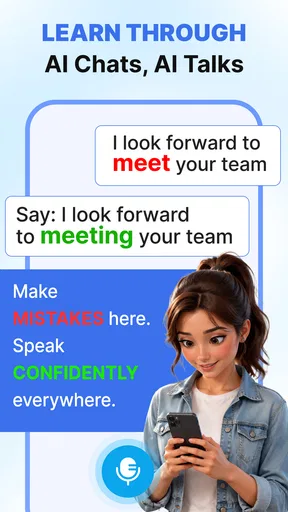


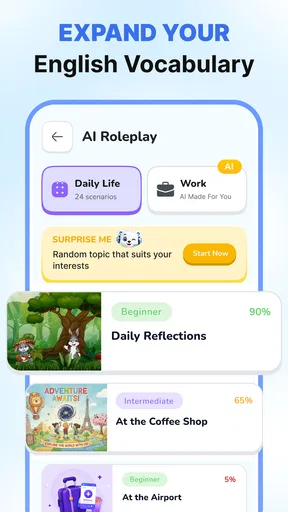

 Analysis by AppCompare
I judge a language tutor by what it helps me say when I’m put on the spot, not by how many lessons it can promise. Lurnia: AI Language Tutor is an education app from Astronex built around speaking practice for everyday conversations. That focus is appealing if you understand some of a language but hesitate when it is time to respond. My cautious take is that Lurnia is worth exploring as a practice tool, while anyone sharing personal details in an AI conversation should first make their own comfort with the app’s visible controls and choices a priority.
A useful first test: can it fit your real routine?
Before deciding whether a speaking app belongs in your day, I would try it at the moment I am most likely to need it: a short break, a quiet commute, or a few minutes before an appointment. The goal is not to measure how much ground I can cover, but to find out whether I can begin speaking without a long setup. If opening the app and choosing a topic feels like too much friction for a brief session, that matters just as much as the quality of the conversation.
I would also test the same practical situation on two different days rather than judging from one unusually easy exchange. The second attempt can reveal whether I remember useful wording or whether the conversation only felt successful while it was happening. That small comparison gives a more honest sense of learning value than simply counting how long I spent practising.
Speaking practice is the point
Many language apps make vocabulary, grammar, and streaks the center of the experience. Lurnia’s defining idea is different: use AI to practise speaking as preparation for real exchanges. That makes it easier to see where it might fit. It is not a substitute for a teacher who can assess your learning over time, and it is not necessarily the best match if your main goal is a structured grammar course. It is most compelling as a way to turn knowledge you already have into words you can actually use.
I would approach it with a small, concrete goal rather than an ambitious promise to become fluent. For example, practise how to introduce yourself, ask for directions, or explain a simple preference. A focused session gives you something useful to repeat outside the app; an unfocused one can become a string of exchanges without much carryover. The real value is rehearsal that feels close enough to conversation to expose where you freeze.
The app has a 4.7 average from around 1.4 thousand ratings, and it has passed a million installs. Those figures suggest that plenty of people have tried it, but they do not tell me whether its AI fits every learner, language, or speaking style. I would treat them as a reason to consider giving it a try, not as a guarantee that the practice will suit your needs.
Who is likely to get the most from it
Lurnia seems best suited to learners who can already form basic sentences and want a low-pressure place to practise producing them. If you are preparing for a trip, moving to a place where another language is spoken, or simply tired of understanding more than you can say, conversational practice has a clear purpose. It can also suit someone who wants short speaking exercises woven into a day, rather than a long study block.
Worth Reading Before You Choose

Flipboard Shows What News Apps Must Do Beyond the Feed

Switching to Android Auto Means Rethinking Your Driving Routine

Google Calendar Makes a Crowded Week Easier to Manage

Ludo King Makes the Most of the Minutes Between Plans

Baby Panda World Brings Quick Play to Modern Phones, but Its Game Library Feels Busy

ESPN’s Live Game View Makes Following Close Games Easier
It is a less obvious fit for a complete beginner who needs every new word explained in sequence, or for a learner whose priority is detailed feedback on pronunciation, grammar rules, and writing. The app’s central promise is speaking practice, so I would not assume that it replaces a textbook, a class, or a specialist pronunciation coach. If you need a carefully sequenced curriculum or human correction, choose a tool that explicitly centers those needs.
Trust starts with what you can actually see
AI conversation can feel personal even when the topic is ordinary. You might practise describing your work, your family, or a travel plan, and those examples can reveal more than a list of vocabulary words. I recommend keeping early practice fictional or general until you have reviewed the app’s own privacy information and understand the choices it presents. This is a sensible habit with any conversational AI, not a claim about how Lurnia handles data.
I would also check what the app asks for when you install and use it, and whether each request makes sense for the activity you want to do. The available facts about Lurnia do not establish particular permissions, storage practices, or account controls, so I would not infer them. That makes a quick review of the app’s permission prompts and privacy details worthwhile before using real names, contact information, or sensitive personal stories in a conversation.
There is a practical way to reduce exposure without giving up useful speaking work: invent a scenario. Practise ordering a meal as a fictional traveller, describe an imaginary apartment, or talk about a made-up workday. You still need to retrieve vocabulary and respond naturally, but you avoid turning a language exercise into a disclosure of your real circumstances. This is especially useful when testing whether the conversational format feels comfortable.
Make the session work for you
One useful workflow is to pick a situation you are likely to face and repeat it with a different constraint. First practise asking for something politely; then try again as if the place is noisy or you need to keep the exchange brief. The point is not to assume Lurnia has a special mode for each case, but to bring a clear task to whatever speaking practice it offers. A specific goal makes it easier to notice whether a session helped.
Another worthwhile habit is to keep a small personal list of phrases that slowed you down. After practising, write down the idea you struggled to express, then try saying it again without reading a prepared answer. This creates a bridge between an AI conversation and later use in the world. It also helps prevent a common weakness of conversational practice: feeling fluent in the moment because the other side keeps the exchange moving, without remembering what you learned afterward.
For a realistic everyday example, imagine that you have ten minutes before leaving for work and want to prepare for a café visit abroad. Rather than cover every possible topic, rehearse greeting someone, ordering a drink, and asking one follow-up question. Later, note which phrase you had to reach for. This compact routine is more useful than treating the app as a complete language course squeezed into a spare moment.
Compared with flashcard apps, Lurnia’s conversational emphasis may help with response speed and confidence, while flashcards are usually more direct for memorizing a set of words. Compared with a human tutor, an AI practice app can be easier to fit into an ordinary schedule, but a person can better notice context, intent, and recurring mistakes. I would use these approaches as complements when possible: review vocabulary elsewhere, practise speaking here, and turn to a teacher when you need nuanced correction.
Choice, cost, and the practical trade-offs
Lurnia is free to install, with in-app purchases ranging from $2.49 to $84.99 per item. I would start by seeing whether the free experience supports the kind of practice I actually want before paying for anything. The wide spread means it is especially important to read the purchase screen carefully and distinguish a one-time item from any other arrangement it presents. Do not buy on the assumption that a paid option will solve a mismatch in teaching style.
The app is rated for Everyone and requires Android 7.0 or later. Its current version is 1.4.0, and it was released on June 17, 2026. These details make it straightforward to check basic compatibility before installing, but they do not tell you whether a particular device’s microphone, network conditions, or speaking environment will make practice pleasant. I would test a short session somewhere quiet before deciding it belongs in a daily routine.
For user agency, I would look for clear ways to manage the account, review privacy choices, and control any optional features before making Lurnia part of a regular study habit. I cannot assume which controls are present, so I would not treat their existence as established. If the choices shown in the app do not give you enough confidence, you can keep practice generic, avoid sharing identifying details, or choose an offline method such as speaking from a textbook prompt.
There is also a learning trade-off in letting AI carry the conversation. It can make practice feel less intimidating, yet a smooth exchange may conceal whether you are building durable skill or simply following the moment. I would pause after a session and try to recreate the key phrases from memory. If that proves difficult, shorten the next practice and focus on fewer expressions. This turns a pleasant conversation into a more deliberate learning loop without assuming the app tracks progress in a particular way.
My cautious verdict
I see Lurnia: AI Language Tutor as a promising option for people who want to speak more and freeze less, especially when they need a convenient way to rehearse ordinary situations. Its strongest case is not that it replaces every other language resource, but that it puts conversational practice at the center. Try it with a narrow goal, fictional details, and a short session; then judge whether the experience helps you form your own responses rather than merely keeping a chat going.
I would skip it if you need a verified, highly structured course, dependable human feedback, or clear privacy and account controls that you have not been able to assess for yourself. For everyone else, the sensible approach is to explore the free starting point, inspect the choices and purchase terms in the app, and keep sensitive information out of practice until you are comfortable. That gives Lurnia a fair test while leaving you in control of what you share and how much you rely on it.
Deciding what to share and what to practise
A helpful boundary is to separate language difficulty from personal disclosure. If you want to practise explaining a medical appointment, for instance, you can use an invented patient and a generic symptom rather than your own health history. The speaking challenge remains: asking for clarification, describing a problem, and checking that you understood. This keeps the exercise relevant while making it easier to decide what details you are comfortable entering into an AI conversation.
When you inspect the app’s visible choices, I would do so before building a routine around it, not after sharing information you later wish you had kept private. If the choices are clear enough for your comfort, proceed with ordinary practice; if not, keep examples fictional or use a non-digital prompt. That is a practical decision, not a judgment about the app’s unseen data handling.
Choose the tool around the task
The right alternative depends on the gap you are trying to close. If you repeatedly forget basic words, a vocabulary deck may be more efficient because it puts recall first. If you know the words but cannot assemble them quickly, Lurnia’s speaking-centered approach is the more relevant experiment. If your goal is a corrected accent or careful explanation of a recurring grammar error, a qualified human teacher is a stronger choice, even if arranging that help takes more effort.
I would also avoid treating a conversational AI as proof that an expression is natural in every setting. For travel preparation, practise a few dependable exchanges, then cross-check important phrases with a trusted learning resource or teacher if the consequences of misunderstanding would be significant. That extra step matters more for a work presentation, official appointment, or sensitive conversation than it does for a casual café order.
For someone with a busy schedule, a useful rhythm is to choose one situation before opening the app, speak through it, then spend a minute afterward recalling the phrases without help. If that final recall is consistently hard, reduce the number of ideas in the next session rather than making the session longer. If speaking aloud is impractical where you are, an offline written exercise may be the better choice at that moment; the app’s central benefit is less useful when you cannot comfortably speak.
My recommendation is therefore deliberately limited: give Lurnia a try if conversational hesitation is your main problem and you are comfortable reviewing the choices it presents. Keep expectations narrower than “learn a language,” and judge it by whether you can reuse a phrase in a real exchange. If you need structure, detailed correction, or stronger reassurance about privacy controls before you begin, choose a resource that makes those needs its clear priority.
Pros
- Offers AI-guided practice for learners who want flexible study sessions.
- Can provide a low-pressure way to practise speaking and writing.
- Personalized interactions may help focus on individual learning needs.
- Useful for fitting language practice into short breaks throughout the day.
- May suit learners who prefer interactive practice over textbook-only study.
Cons
- AI feedback may miss context or give inaccurate language corrections.
- Practice quality can depend on the clarity of your prompts and responses.
- A stable internet connection may be needed for AI-powered features.
- AI conversation may feel less natural than speaking with a human tutor.
- Check subscription terms
- as advanced features may require payment.
FAQs for Lurnia: AI Language Tutor
What is Lurnia: AI Language Tutor, and how does it help with language learning?
Lurnia: AI Language Tutor is a language-learning app built around AI-supported practice. It can help you work on skills such as vocabulary, grammar, and conversation through interactive activities and feedback, depending on the features available in your version. It is best viewed as a flexible practice aid rather than a guaranteed substitute for a structured course, human instruction, or regular real-world conversation.
Which languages can I learn with Lurnia?
The languages offered can vary by app version, region, or the options currently supported by Lurnia’s AI features. Before starting, check the language list in the app or on its official store page, and confirm that your preferred learning and instruction languages are both available. If you have a specific goal, such as preparing for travel or studying a less commonly taught language, verify that the app supports the level and topics you need.
Is Lurnia free to use, or does it require a subscription?
Lurnia may offer free access alongside paid features or a subscription, but the exact pricing and included tools can change over time and differ by platform or country. Review the current in-app purchase details before signing up, paying particular attention to trial length, renewal price, billing frequency, and cancellation terms. A free download does not necessarily mean that every lesson or AI interaction is available without payment.
Does Lurnia provide accurate feedback, and can I rely on it to learn a language?
AI feedback can be useful for practicing and spotting possible issues, but it may occasionally misunderstand context or miss subtle errors in grammar, pronunciation, or natural phrasing. Treat suggestions as learning guidance rather than authoritative corrections, especially when preparing for an exam or handling important communication. For stronger results, compare explanations with reliable learning materials and practice listening and speaking with fluent speakers when possible.
What should I check before downloading and using Lurnia?
Check that your device meets the app’s current requirements and that you have a reliable internet connection if lessons or AI features depend on online services. Also review the permissions it requests, its privacy policy, and how it handles account information, voice recordings, or other learning data. If you plan to use it regularly, confirm the subscription terms and whether the app supports reminders or offline study in your region.


